
Connect your systems
to AI in 5 minutes
Connecting a system to AI usually takes 2 weeks to 2 months of manual development. Konnet Core does it in under 5 minutes: your data speaks to your team through AI-powered dashboards, and to your AI agents via MCP - with full control over what each agent can see and manage.
Traditional integration
2 weeks - 2 months
A developer reads the documentation and the team integrates the API by hand, endpoint by endpoint.
With Konnet Core
< 5 minutes
Paste the documentation URL and your API is connected to AI, ready for dashboards and agents.
Your data speaks to humans and to agents
Konnet Core turns every system with an API into a living source: the same connection feeds your team's dashboards and the AI agents that orchestrate and automate your operation.
With your team: AI-powered dashboards
Data becomes KPIs, traffic lights, rankings, and alerts generated by an AI analyst from your written goal. Everything is born as a draft and you approve before publishing: people decide with vision, not with spreadsheets.
With your agents: MCP servers
Every source is published as a standard MCP server: your in-house systems - the ones that already have an API - become orchestrated and automated by AI agents. You control, easily and securely, what each agent can see and what it can manage.
From raw source to decision, in four steps
Connect your sources
REST APIs, MCP servers, or web portals. Paste the documentation link and your API is connected in about 5 minutes, ready to power dashboards and flows.
Describe your vision
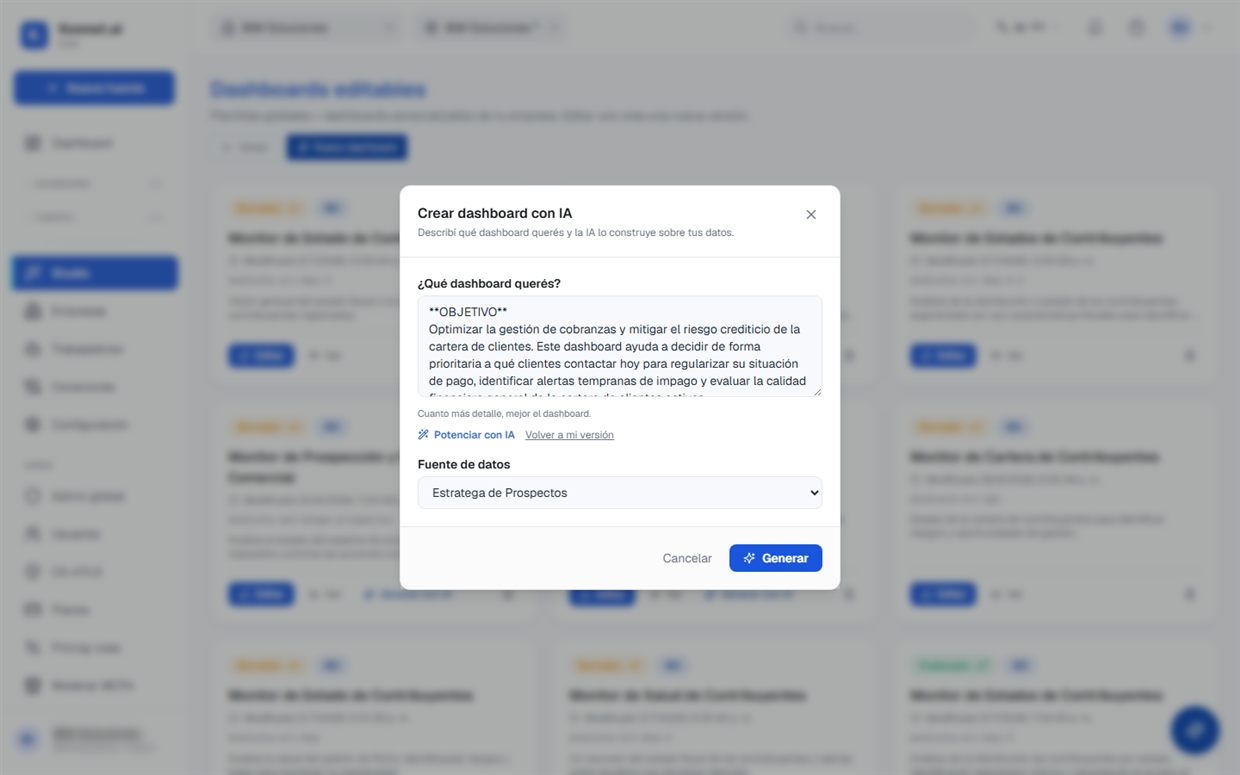
Write the goal in your own words. The analyst enhances it with measurable metrics and generates a targeted dashboard: KPIs, traffic lights, scores, and rankings.
Review and publish
Everything arrives as a draft over your live data. Every proposal is validated against the real catalog - nothing made up - and you decide what gets published.
Converse and evolve
Request changes in natural language: "change this KPI", "add a traffic light". The copilot plans, you approve, and the system learns from your account.
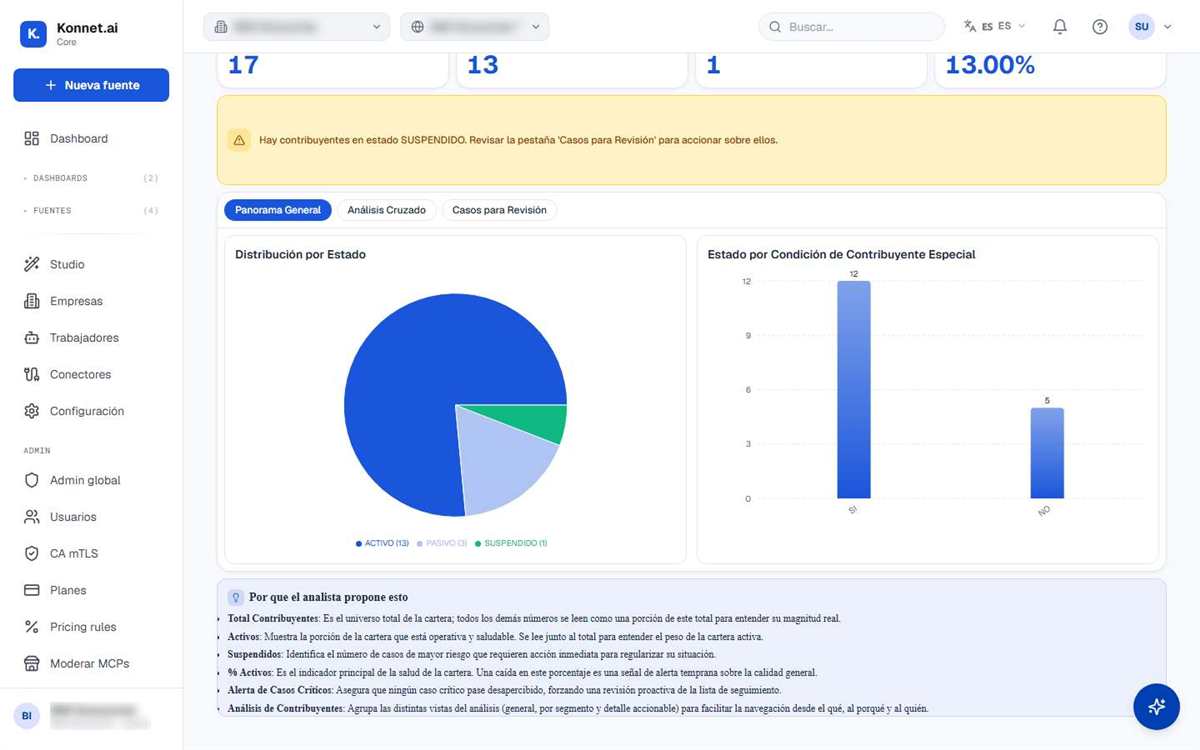
Dashboards with charts and KPIs on your live data
Real Konnet Core screens, not illustrations: an AI-generated dashboard with your indicators, charts, and alerts, connected to the source. Data updates on its own - you open the dashboard and see today's status, not the last hand-built report.
A data team that fits in a browser tab
Unlimited sources
Every new source is configuration, not a project: APIs, MCP servers, and public portals enter the same pipeline and feed any dashboard.
AI-generated dashboards
KPIs, traffic lights, weighted scores, rankings, and funnels are born from your written goal, not from weeks of consulting.
Alerts and scheduled queries
Data refreshes on its own and signals arrive on time: a traffic light that changes, a threshold crossed, a report every Monday.
Share and export
Dashboards shareable by link with access control, and exports to Excel and CSV for whoever lives in the spreadsheet.
Multi-company and multi-branch
A structure of groups, companies, and branches with strict isolation and per-level roles: everyone sees exactly what is theirs.
Three languages and your terminology
Spanish, English, and Portuguese, with your business vocabulary fully configurable: your "customers" can be called members, patients, or affiliates.
AI proposes.
Humans approve.
It is Core's unbreakable rule: no dashboard is published, no destructive change is executed, and no agent modifies its behavior without a person approving.
- Every AI proposal is validated against your real catalog, field by field
- Audit log of sensitive operations: who, what, when
- Personal data protected: kept out of logs and filtered when shared
- Encrypted credentials and strict per-company isolation
Designed following ISO 27001 · 27701 · 27018 guidelines
The copilot proposes a plan
Nothing runs without this click
Konnet speaks MCP, the standard for AI agents
Your sources are published as a standard JSON-RPC MCP server: connect them to Claude or to your own agents with a URL. And in the other direction, Core consumes any third-party MCP server as just another source. Documented REST API included.
POST /mcp/your-source/rpc
{ "jsonrpc": "2.0",
  "method": "tools/call",
  "params": { "name": "query" } }
200 OK · 17 rows · no PII
Vision becomes action through the channel your customer already uses
The delinquency traffic light triggers the reminder; the opportunity ranking orders your prospecting. Your APIs, connected in minutes, power the flows that execute: Konnet Flow acts on what Core detects.
Frequently asked questions about Konnet Core
Which data sources does Konnet Core support?
REST APIs (the assistant resolves the integration from the provider's OpenAPI or Postman documentation), third-party MCP servers, and public web portals. Every new source is configuration, not a development project: it enters the same pipeline and can immediately feed dashboards, alerts, and Konnet Flow messaging journeys.
How does the AI avoid making up data in the dashboards?
Every proposal from the AI analyst is validated field by field against the source's real catalog: if a KPI, a traffic light, or a ranking references a column that does not exist, the proposal is rejected before it reaches you. In addition, everything is born as a draft and nothing is published without human approval.
Can dashboards be shared and exported?
Yes. Dashboards are shared by link with access control per company and per role, and data exports to Excel and CSV. You can also schedule queries so the data refreshes on its own, and receive alerts when a traffic light changes or a threshold is crossed.
What is MCP and why does it matter?
MCP (Model Context Protocol) is the open standard AI agents use to connect to tools and data. Konnet speaks it in both directions: your sources are published as a standard MCP server so you can connect them to Claude or to your own agents, and Konnet consumes third-party MCP servers as just another source.
How do I connect my system to Konnet Core?
With a guided six-step assistant: paste your API's URL or document, the AI reads the documentation and detects the available actions, you enter the credentials (they are stored encrypted), a live test confirms the data is coming through, you decide whether to publish the source as an MCP server for agents, and that's it. The whole process takes about 5 minutes and requires no coding: what a traditional integration solves in weeks is configuration here.
Are my credentials and data safe in Konnet Core?
Yes. Your systems' credentials are stored encrypted and are never shown again; each company operates isolated from the others, and every query respects the scope of your role. For AI agents, you decide what each one can see and manage when you publish the MCP server, with per-tool permissions. And the product's guiding principle: AI proposes, and someone on your team approves before anything is published.
Can I control what each AI agent sees?
Yes, that control is the heart of Konnet's MCP. When you publish a source as an MCP server, you choose which actions are exposed - query only, or management too - and what data each connected agent can see. Personal data is projected out of the responses when the consumer is a third party, usage is logged operation by operation, and you can revoke an agent's access at any time without touching the rest.
Do dashboards update on their own?
Yes. Each dashboard stays connected to your sources: the data refreshes on a schedule or on query, and KPIs, traffic lights, and rankings are recalculated with live data, without exporting spreadsheets or building reports by hand. You can schedule alerts and periodic queries, export whenever you need it, and share the board with your team with access control per company and per role.
The report you build by hand today generates itself tomorrow
Bring a real data source to the demo - your API, your industry portal, your never-ending spreadsheet - and leave with a generated, governed dashboard.
Book a demo